February 2nd, 2026
AI Chat File Attachments - Send PDFs, Word docs, and Excel files to AI
iPad 3-Panel Layout - Full desktop experience on your iPad
Manual Sync Button - Refresh your data without logging out
Improved Goal/Tag Navigation - Seamlessly return to where you came from
I wanted to ask "summarize this PDF" but could only attach images. Taking screenshots of every page was such a hassle. Same with Excel data—copy-pasting or screenshotting everything was way too tedious.
You can now attach various documents directly in AI chat:
PDF - Contracts, papers, reports
Word (.docx) - Proposals, meeting notes
Excel (.xlsx) - Spreadsheets, data files
Images - Screenshots, photos (as before)
Just click the 📎 clip icon or drag and drop your file. Files up to 10MB are supported.
Using OFFLIGHT on my iPad felt cramped—I couldn't see the task list and details at the same time. Constantly switching back and forth was frustrating.
iPad now supports the full 3-panel layout just like desktop:
Left: Task/Note list
Center: Details
Right: AI Chat
Rotate to landscape for an even better experience!
Sometimes tasks wouldn't show up or the calendar looked off. The only fix was logging out and back in, which was really annoying.
Click the sync indicator in the calendar header to instantly sync your local data with the server.
When things look weird, just hit refresh—no logout required!
I clicked on a Goal from Notes, but when I hit the X button, it took me to All instead of back to Notes. Breaking my flow just to navigate back was frustrating.
Remembers where you came from: Click a Goal from Notes → Notes stays highlighted in the sidebar
Returns you to the right place: X button takes you back to your original page
Auto-selects the right tab: Coming from Notes? Goal view opens with the Notes tab selected
December 28th, 2025

Lists are now Goals + Tags - Projects become Goals, categories become Tags
Dedicated Goal/Tag Views - See only related tasks + auto-calculated progress for Goals
Multi-select - Select multiple tasks and batch process them
Go to Date - Jump to any date instantly
I had "Landing Page Launch" (a project with a deadline) mixed together with "Development" (just a category) in the same list. They're completely different things.
When a project wraps up, I want it gone from my view—but not deleted. I just want to archive it.
We split Lists into two purpose-built tools:
GoalTag | ||
Purpose | Projects with a start and end | Simple categorization |
Examples | "App Launch", "Moving", "Q1 Marketing" | "Dev", "Ops", "Personal", "Urgent" |
Progress | ✅ Auto-calculated | ❌ N/A |
Hierarchy | ✅ Sub-goals supported | ❌ Flat |
Per Task | One goal | Multiple tags |
Read on for the details.
Finding tasks for a specific goal meant endless scrolling through my task list. I just wanted to see all tasks for that goal in one place.
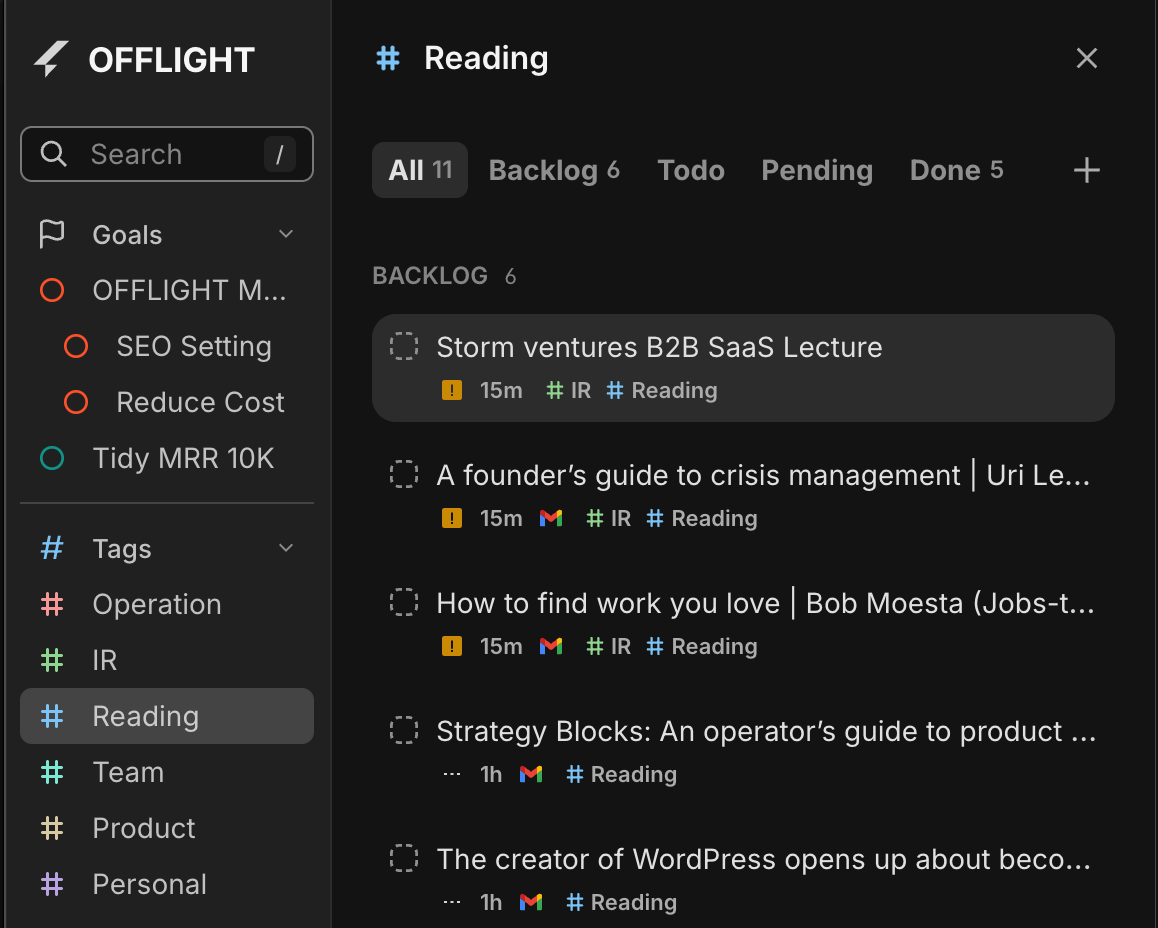
We heard you. Goals now live in the sidebar.
Each goal shows a progress bar at a glance
Click to open a dedicated view with only that goal's tasks
Break down large goals into smaller milestones.
Auto-calculated progress: Parent goal progress updates based on sub-goals
Choose between average or sum calculation
Done with a goal? Archive it in Settings to hide it from your list. You can always restore it later.
ShortcutAction | |
| Enter and switch between Goal/Tag views (Shift + , / Shift + .) |
| Create new goal |
| Assign goal to task ( |
Unlike Goals, Tags are for lightweight categorization.
Assign multiple tags to a single task
Color-code tags for visual distinction
Click any tag in the sidebar to see all tasks with that tag. Works just like Goal view.
ShortcutAction | |
| Enter and switch between Goal/Tag views (Shift + , / Shift + .) |
| Assign tag to task |
Cleaning up 10 completed tasks meant deleting them one by one. Tagging multiple tasks with the same tag? Same story—tedious repetition.
Select multiple tasks, then:
Bulk delete (with undo support)
Bulk tag assignment
ShortcutAction | |
| Add individual tasks to selection |
| Select a range |
| Expand/shrink selection with keyboard |
Someone asks "Are you free on December 20th?" and I had to click through the calendar day by day to find out.
Jump to any date instantly. Natural language input like "12/20" or "next thursday" works too.
ShortcutAction | |
| Open date picker |
| Type "12/20" or "next thu" to jump directly |
Sidebar (SNB) Improvements
Click sections in collapsed mode to see a mini popover
Create Goals/Tags on the Fly
Create new goals or tags directly from the task creation dialog
Task Card Layout Refresh
Integration icons (Gmail, Slack, etc.) moved from title area to bottom, now in color
Calendar Navigation
Week Start option (Monday or Sunday)
Switching between 3-day/5-day views now keeps today visible
Separate buttons for moving by day vs. N days
Multi-select 3D Flip Animation
When you select multiple tasks, the TimeTracker flips in 3D to reveal batch action controls
Fixed a visual glitch where deleted/completed tasks would briefly reappear when processing multiple tasks in succession
This update was a beast.
It started simple: I just wanted to make Lists accessible from the sidebar. But as I built it, the fundamental limitations of Lists became impossible to ignore. All the feedback you'd shared about List frustrations came flooding back.
The moment I decided to split Lists into Goals and Tags, I realized something else: migrating existing lists to tags would be painful without multi-select. So that went on the list too.
Building dedicated views for Goals and Tags exposed a mess of keyboard shortcut bugs. The shortcuts had no awareness of which layer you were on—regular view, Goal view, Command Bar. A full refactor of the shortcut system was unavoidable. It was painful, but necessary groundwork for moving faster going forward.
There's a bigger vision behind investing so heavily in Goals.
Goals, metrics, tasks—this kind of structured data is exactly what AI agents need to actually help you get things done. Using Claude Code has made this crystal clear to me. An agent that understands your goals, knows what's done and what's left, and genuinely helps you make progress. I'm exploring what it takes to build that kind of experience, the OFFLIGHT way.
The first step: Daily Planning & Reflection.
Let's be honest—OFFLIGHT today feels like an endless list of things to do. I want to change that. A space where you can look back at yesterday, look ahead to today, and figure out where you actually want to spend your time—with an AI agent built specifically for this.
If there's something you'd love to see in Daily Planning, I'd love to hear about it :)
December 12th, 2025

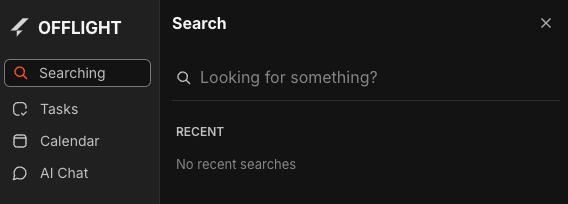
🔍 Search - Find your tasks quickly
🧭 Sidebar - New shortcut & smoother animation
💬 Support - Chat with us without leaving Offlight
🐛 Task creation bug fix
You can now quickly find the tasks you're looking for.
How to open
Press / key
Click the search button in the sidebar
What you can search
Task title
Email body (for tasks created from emails)
Task notes
Search result preview
When matched in email body or notes, shows where it was found
Search terms are highlighted in yellow
Recent searches
Your search keywords are automatically saved (up to 5)
Quickly select from recent searches when you open the search panel
💡 Thanks to Alex for suggesting the search feature!
New shortcut
Press \ to toggle the sidebar
Animation improvements
Fixed awkward icon movements when opening/closing the sidebar
Now opens and closes much more smoothly
We've switched from ChannelTalk to Featurebase.
Chat without leaving Offlight: No more new windows - chat directly within the app
Reply in-app: When you get a response, view and reply right inside Offlight
AI + Live support: Our AI trained on Offlight guides answers first, and connects you to me directly when needed
Fixed an issue where pressing Enter didn't select @commands in the task creation form
💡 Thanks to Taewook Kim for reporting this bug!
All-day tasks
Plan tasks for a specific date, not a specific time
Quick List filter
Select a List from the sidebar to instantly see only tasks in that List
We're committed to building features that you actually need.
Have a feature request? Let us know in the comments or via Featurebase
Your feedback on this update would be incredibly helpful 🙏
December 5th, 2025

Manual Mode: A mode to manage schedules directly without Auto Planning is back.
Sync Status Indicator: Check in real-time if your data is saved (Synced/Offline).
Calendar Height Settings: Adjust the height of calendar slots (Medium/High).
'C' Shortcut Improved: Creates an event at the current time on today, regardless of which date you are viewing.
Create & Play: Create a task and start the timer immediately (Shift + Enter).
Bug Fixes: Improvements in sync stability, sequential playback errors, UI refinements, and more.
Why did we bring it back?
Actually, Manual Mode is similar to the manual planning feature that existed in the early days of OFFLIGHT. It disappeared with the introduction of Auto Planning, but it has been reborn based on feedback from many users.
Pain points of the existing Auto Planning:
"It pulls in all empty schedules regardless of what I want."
"Work has context, but it just arranges everything forcibly, so I stopped creating tasks in OFFLIGHT."
Now, you can turn off Auto Planning and manage your schedule entirely manually.
Auto Planning performs complex calculations to determine the optimal schedule. This process naturally led to some sluggish behavior. In Manual Mode, these calculations are removed, making the product run much faster and smoother.
How to enable Manual Mode:
Settings > Auto Planning > Toggle OFF

The moment you turn it off:
Auto-arranged sessions (dotted lines) will be deleted.
Manually set Time Blocks and Schedule After settings are maintained.
The Timeline tab changes to a Todo tab.

Conditions for a task to appear in 'Scheduled':
If a Time Block is created (Time assigned on the calendar).
If 'Schedule After' is set (Date assigned only).
If neither exists: → Appears in Unscheduled.
If a task has both a Time Block + Schedule After:
It is grouped based on the Time Block.
Example: Even if 'Schedule After' is set to Friday, if the Time Block is set for today, it appears in Today.
Scheduled Sorting Rules
Within the same date group:
Tasks with Time Blocks come first (sorted by start time).
Date-only tasks come next.
Tasks with Time Blocks display a 🔒 icon and the start time (e.g., 09:00) as a label.
How to Move Tasks
Action | Result |
Drag task to an empty time on the calendar | Creates Time Block → Scheduled |
Drag task to a date group (Today, Tomorrow, etc.) | Sets 'Schedule After' → Scheduled |
Drag from Scheduled → Unscheduled | Cancels Schedule |
Drag within Unscheduled or | Reorders Tasks |
"Is it saved? Is it not?"

OFFLIGHT was built to use local memory for fast client response speeds. However, in unstable network environments, or if the page was refreshed before synchronization was complete, data could be lost, or edits reverted.
"I edited it, but is it saved?"
"Is it safe to refresh?"
"Will it show up on my other devices immediately?"
Now, you can check the status in real-time at the top right of the screen.
Icon | Status | Description |
🟢 | Synced | All changes are saved to the server. Safe to refresh. |
🟡 | Syncing... | Saving in progress. Please wait a moment. |
⚫ | Offline | Internet disconnected. Saved locally; auto-syncs when connected. |
This applies to calendar event edits as well. Whether it's a task or a calendar entry, ensure the status is Synced for safety.
Why did we make this?
Users view the calendar in various environments:
Large Monitor: "One slot is too narrow; I can't see the content."
Laptop: "It's just right."
Now you can adjust the height in Settings > Calendar.
Setting | Height | Recommended Environment |
Medium | 60px | Laptops, Standard Monitors |
High | 84px | Large Monitors, Schedules with many details |
Improvements
Pressing the C key on the calendar now creates an event at the current time.
Previous Issue:
If you were viewing a different date, the event was created on that date.
You had to hunt for where the event was created.
Now:
Pressing C automatically jumps to Today + Current Time.
The event is created right in front of your eyes.
Why did we make this?
There was a frequent pattern of creating a task and starting it immediately:
Create Task
Click Play Button
Now you can do it all at once.
How to use
Mouse: Click the ▼ next to the Create button → Select "Create & Play".
Keyboard:
Enter → Create only.
Shift + Enter → Create + Start immediately.
When using Create + Play, the calendar automatically scrolls to the current time. Even if you are viewing a different date, it moves to Today.
Cache Synchronization Stabilization
Fixed an issue where deleted tasks would momentarily reappear and then vanish.
Fixed an issue where edited content would revert briefly before applying.
Fixed an issue where tasks would jump between different locations.
Lane UI Improvements
Lane open/close states are now maintained after a refresh.
Fixed an issue where the "Create Task" button at the top of a lane overlapped with other elements, making it hard to click.
Fixed a scrolling issue where selected tasks were hidden behind the Sticky Header.
Input UI Improvements
Fixed an issue where keyboard arrow keys didn't work when entering dates for 'Schedule After' or 'Deadline'.
Dates can now be selected using only the keyboard without mouse clicks.
Sequential Playback Fixes
Scenario: Task A Create+Play → Task B Create+Play.
Previously: Both A and B appeared to be playing simultaneously. 😱
Now: A automatically pauses, and only B plays. ✅
Session Save Logic Change
Previously: Playback under 5 mins → Not recorded.
Now: Playback under 10 seconds → Not recorded.
Sessions are only deleted if you "accidentally clicked and turned it off immediately." Short tasks are now recorded in history.
Other Fixes
Fixed an issue where Auto Planning would run when moving sessions in Manual Mode.
Fixed an issue where scroll position became misaligned after changing Calendar Height settings.
Fixed an issue where the task card quick menu was always visible (now only visible on hover).
Fixed an issue where content wasn't saved in the task creation popover (now saves even if you press ESC).
TMI: Today (US time) is my birthday! haha.
I am genuinely happy to be able to deliver these long-awaited improvements on my birthday. :)
Special Thanks to Alex for sharing user feedback with me :)
November 28th, 2025
Improved

Just Added Task Duplicate feature. CMD or CTRL + D or use quick action from drop down or right click from calendar events.
Subject: Regarding the late status update for OFFLIGHT
There has been a long silence regarding OFFLIGHT updates. I am truly sorry for that. The formal OFFLIGHT product team no longer exists; it is just me now. From here on out, I will be operating as a solo developer.
It took me some time to recover from the setback. I needed time to reflect on whether I could continue down this path. Although I am not 100% certain yet, I have decided to start small by fixing the critical bugs that were previously neglected.
To be honest, ever since the AI boom in the productivity sector began, I focused too much on new technical features and stopped listening to what users were actually asking for. I realize this might be too late, but I want to start listening to users again—like rising from the ashes.
Thanks again, Dan
July 18th, 2025
This pull request includes several significant updates to the OFFY application based on user feedback and usability studies. Key changes include:
UI Adjustments: The OFFY task lane has been moved back to the left side of the interface, allowing users to focus on navigating tasks more effectively.
Task Detail Display: When a task is opened, its details now appear in the central area of the screen, providing a more focused view for users.

Voice Input Features: Users can now utilize voice commands to interact with OFFY, including summarizing emails and creating tasks. The short cut is "ctrl + shift” it is super easy to use :)

Email Reply Functionality: Users can draft and send replies to emails using AI assistance, streamlining communication.

Event Creation: Users can quickly create events using voice commands, enhancing scheduling efficiency.

Memory Feature: OFFY can now memorize user preferences and information, allowing for a more personalized experience.

Future Plans: Consideration for an inbox feature to manage incoming tasks and notifications more effectively.
May 19th, 2025

OFFLIGHT now has a built-in AI assistant: OFFY is here!
Invite your friends and get $10 credit each with our new referral program
We’ve taken the first step toward a more AI-centered OFFLIGHT experience.
OFFY is now integrated and ready to help you:
Chat naturally with OFFY
Ask questions, get suggestions, and talk like you would with ChatGPT.
Brainstorm ideas and get task suggestions
Share your ideas and let OFFY turn them into actionable tasks.
Create tasks directly from email
Turn messages into to-dos with just one click.
The Backlog has also moved to the center lane for easier navigation.
Use Tab and Shift + Tab to move between Timeline and Backlog smoothly.

Our new Refer & Earn program lets you and your friends enjoy OFFLIGHT together — and get rewarded.
Give $10, Get $10
When someone signs up with your referral link and starts a free trial,
both of you will receive $10 in credit.
No payment required
You’ll get the reward even if your friend doesn’t subscribe to a paid plan.
Invite via link or email
Copy your referral link or enter their email to send a direct invite.
How to access the referral page:
Click the gift icon in the Task Controller
Or go to Settings → Refer and Earn

It’s been a while since we last shared an update.
We’ve been quietly building behind the scenes — like a craftsman obsessing over every detail — to deliver a truly 10X experience. Now that the foundation is ready, we’ll be shipping improvements more frequently and sharing updates with you on a regular basis.
We’re excited to hear your feedback. Let’s build something amazing together. 🙏
December 16th, 2024
Announcement
Over the past two months, we’ve been working hard on stabilizing and speeding up our service. One big challenge was the laggy experience when using mouse Drag & Drop or opening task and event popovers, especially when your calendar was packed with events. We’re happy to say that all these issues are now resolved! We’re confident you’ll notice just how smooth things have become.
The final hurdle in our optimization journey was tackling the lag when handling lots of calendar events, tasks, or lists. Now, Drag & Drop and other interactions are much more responsive. Instead of just reading about it, we recommend you watch the video and experience the improved performance in OFFLIGHT yourself!
⬆️ Check out this demo video to see how smoothly the calendar performs, even with tons of events 😎
Here’s what’s improved:
Creating events by dragging in the calendar is now much faster.
Double-clicking to create events in the calendar is quicker.
Dragging events or tasks to move them is smoother.
Popover windows for tasks and calendar events now open faster.
Editing event names no longer lags – it’s lightning-fast now!
We’ve also made significant updates to the mobile version with the 0.2.1 and 0.2.2 releases.
Tasks in the inbox now appear in the most recent order at the top.
Newly created tasks in the inbox will be added to the top of the list.
Fixed a visual issue where the loading animation overlapped the page during a refresh, and updated the design.
Improved calendar navigation for Planning and Deadline custom date settings – now you can swipe by month!
👉 Download for iOS
👉 Download for Android
Fixed an issue where switching between all-day events and regular events wasn’t working.
Resolved a problem where dragging to change times wasn’t possible when Google Calendar sync was disabled.
Fixed color-related bugs in the time-blocking task popover.
Resolved an issue where dragging or adjusting the end time of an event failed if the popover was open.
Fixed a bug where clicking on linked tasks in mobile opened the page in-app incorrectly.
Fixed a bug where ✅ wasn’t showing in the calendar when a task was completed on mobile.
Fixed an issue where the desktop app wouldn’t open in Windows environments.
Resolved an issue where using the command bar in the desktop app to set up Planning or lists didn’t allow for clickable selection.
As we announced on December 5, OFFLIGHT will transition to a paid service starting December 17 at 12:00 AM KST.
No need to worry about an abrupt change! From December 17 onward, you can start a 2-week free trial of the Pro Plan whenever you’re ready by clicking “Start Free Trial.” (No credit card is required!)
Existing users will receive an exclusive Early Bird discount of 20% off the Pro Plan subscription.
A free version with limited features and usage will not be available after the transition.
The Believer Plan, our most affordable option, will be available for purchase until December 16 at midnight – subscribe now to lock in the lowest price!
For more details, check out our announcement here 🙂
The initial specs for Dynamic Planning are ready, and we’ve set up a “Launch Pad” environment where our Makers can start testing it internally. Starting next week, we’ll dive into the development of this exciting feature.
Once we have the minimum functionality ready, we plan to invite our subscribed users to join the testing phase and provide feedback before the official launch. While we’re still in the early stages, we can’t wait to share more details soon. Stay tuned for exciting updates! 🫡
Genie117, mithil1219, eszenyig, JigneshParmar, SuryadiLaij, Sushree, 김정동, KribitzSven, jon.highmu, pastorluisyanez, binna.kim, BrianKang, yjchoi, jchang070731, Mithil, 김태욱, Havish, kasey13ch, snow.kwon, andry, gabe, jin, 0214leedasol, jchang070731, 김영호, kimyoon21, TommyGiesbrecht, 오윤재, 김태규, 이혜환, 유병찬, sungwon.kang, minje.study, noble781, lucio.penso
Thank you to everyone who shared your valuable feedback with us. Your support has made this year truly meaningful. Let’s finish December strong, and we’ll see you in the new year with even better experiences 🙂
December 5th, 2024
Announcement
We would like to express our heartfelt gratitude to everyone who has supported and cherished OFFLIGHT.
Since the launch of our first closed beta on July 24, 2023, OFFLIGHT has been continuously evolving for over 500 days, offering all features for free while actively incorporating your valuable feedback. Starting as a simple to-do list with integrations for Slack, Notion, and Gmail, OFFLIGHT has grown into a comprehensive productivity tool. It now offers advanced features such as calendar management, customizable shortcuts, mobile and desktop apps, and a global command bar, along with significant improvements in stability and performance.
Throughout this journey, one of the most frequently asked questions from our users has been, "How much does OFFLIGHT cost?" Until now, we’ve only offered the Believer Plan, as our primary focus has been on perfecting the product's core functionalities and meeting user needs, leaving pricing decisions for a later stage.
We are now excited to announce the introduction of OFFLIGHT’s official subscription plans, marking the next step in our mission to provide a more sustainable and advanced service. Rest assured, this move is not solely about revenue generation—it’s about ensuring the resources and energy necessary to deliver world-class productivity experiences to our users.
Launch Date: Tuesday, December 17, 2024, 00:00 KST
Plans Available:
Pro Plan (Monthly Subscription): $12/month
Pro Plan (Annual Subscription): $9/month (33% discount)
Benefits for Free Users:
Starting December 17, 2024, 00:00 KST, all free users will receive a two-week free trial of the Pro Plan.
The trial will only begin when you activate it by clicking the provided button, ensuring you can start it at a time most convenient for you.
Believer Plan Users:
Existing Believer Plan subscribers can continue using the service without any additional payments.
Please note that the Believer Plan will only be available for purchase until end of December 16, 2024.
To celebrate the launch of our subscription plans, we’re offering an exclusive Early Bird Discount to our loyal users. And the discount will remain valid for the entire duration of your subscription.
Pro Plan (Monthly Subscription): $9.6/month
Pro Plan (Annual Subscription): $7.2/month (20% discount)
Discount Coupon Validity: Until the end of January 31, 2025
At OFFLIGHT, we have always aimed to bring scattered tasks together, help you plan effectively, and manage your time seamlessly through a beautifully designed UX. As we move forward, our focus will be on creating a more integrated and cohesive experience, with Dynamic Planning at its core. This will enable us to respond in real-time to changes in your schedule, evolving into a true pace-maker for your daily life.
We sincerely thank you for being part of our journey so far, and we hope you will continue to accompany us as OFFLIGHT grows into an even more indispensable tool for productivity.
P.S. For existing OFFLIGHT users who have been relying on our service but are facing financial difficulties in subscribing to a paid plan, please feel free to reach out to us. We will do our best to provide support.
Thank you.
The OFFLIGHT Team
Q. Will the free version provided so far continue to be available?
A. After the transition to a paid plan, only a 14-day free trial will be offered, after which the service will require a paid subscription. In other words, a free version with limited features or usage will not be available. However, pricing is not fixed, so there is a possibility that more affordable lite versions or free versions with usage limits may be introduced in future updates. However, no specific plans have been finalized yet. We will provide further updates as decisions are made.
December 3rd, 2024
New
Improved
Fixed

With the desktop app, you can now bring up the OFFLIGHT Command Bar and create tasks from any screen—no need to open the app! On mobile, we’ve made task editing smoother by reducing unnecessary screen transitions. Let’s dive into all the updates we’ve made for you this week! 😊

The Global Command Bar, one of the most requested features, is finally here! Now, you can create tasks directly in OFFLIGHT, even when the app isn’t open.
Powerful Task Creation: Add a due date, set durations, and connect to your lists—all in one place.(Check out the full guide here)
Default Shortcut: Cmd (Ctrl) + Shift + Space is ready to go, but you can customize it under Settings > Shortcut.
Desktop App Exclusive: (Download Desktop app ➕)
We’ve made mobile task editing much easier. Now, when you edit a task, it pops up as a bottom sheet instead of taking over the whole screen.
Plus, if you close the editor without saving, you’ll now see a popup asking whether you want to save or discard your changes. No more accidental edits disappearing!
👉 Download for iOS
👉 Download for Android

CMD + W: Close the app easily with this new shortcut.
CMD + SHIFT + O: Open OFFLIGHT instantly with this shortcut.(You can customize both shortcuts under Settings > Shortcuts.)
We heard you! Previously, updating OFFLIGHT’s desktop app meant downloading the latest version manually from our website. But now, the app automatically updates itself, so you’ll always have the latest features and fixes without any hassle.
Fixed an issue where logging in or opening a new window on the desktop app caused an error.
Fixed a problem with CMD/CTRL + R not refreshing the app.
Resolved a bug where marking recurring tasks as done didn’t work in the organizing page.
Fixed an issue where task states were incorrect after deleting connected events.
We’ve been chatting with many of you recently, learning how you use OFFLIGHT. Some of you carefully plan and adjust time blocks throughout the day, while others focus on reordering overdue tasks without setting time blocks at all.
Both approaches make sense because, in the real world, plans often change—new meetings pop up, unexpected tasks come in, and some tasks take longer than expected. That’s why we’re working on Dynamic Planning—a system designed to embrace and adapt to these realities.
We can’t wait to share more about this exciting direction through a video soon. Stay tuned!
scw3812, Sunset 082, minje.study, Lee Hyehwan, Candle 853, Yang Sooyoung, easylog365, Ethan Gracer, walihavish, Taegun, josthedude123, maxkim139, 5ddntwhjjt, mithil1219, Dinggul, mygreatventure, Kim Jihyun, Kim Jinho, min0, Dora, Ju-Cheol Jang, Karnan Jag, hyolinkim15—thank you so much for your invaluable feedback. We couldn’t have done it without you! 😊